Article
I Stopped Running AI Agents on My Laptop
Giving AI agents more autonomy is useful. Giving them all of my permissions was probably not the smartest idea.
I use AI agents in auto mode more and more. That gives them more autonomy, and more freedom to do stupid things.
Newer, smarter models may make fewer mistakes. Assuming they will stop making them is dangerous.
Recently, my SonarQube token ended up in a session log that was pushed to GitHub. A GitHub Action noticed it: the secret scanning job failed on the push and told me exactly which credential was sitting in which file.
Thankfully, the repository is private, and that token reads a code quality dashboard. I revoked it, created a new one, and it was over. Ten boring minutes.
I have also had an instruction guardrail ignored, and an issue caused by a script missing a quote. Different causes, same result:
“Oops, I just deleted that without asking. What do you want to do now?”
Well, I would have preferred you to ask that question five seconds ago.
There is a rule that has survived every technological revolution so far: Murphy’s law. If something can go wrong, eventually it will.
Security people are annoying for a reason
I spent six years at SWIFT. You do not spend that much time in that environment without becoming a bit paranoid about security ^^”.
And honestly, who likes security? You build something cool, everything works, and then someone from the Red Team arrives and explains fifteen different ways your beautiful creation can be destroyed. They are basically the people who come to the party to tell everyone the music is too loud.
But their job is more important than ever, in an era where it has become surprisingly easy to break security. Looking at the way I was using AI agents, I had to admit I was ignoring some problems.
Claude (not naming any names) was running directly on my laptop. My laptop had access to source code, GitHub, Azure, Terraform, SSH keys and a lot of other things that had absolutely nothing to do with GroceryMind.
What could possibly go wrong?
So I asked Fable to act as my Red Team. The list of things I should improve was long. Very long. The kind of list where you start thinking: this looks like a month of work and I wanted to build grocery features today.
It also touched technologies I did not know well: GitHub permissions, Azure identities, Docker security, Terraform authentication…
Fortunately, I had something to help me learn all of that: the same AI I was trying to protect myself from.
The goal was never perfect security
There is no magic checkbox called make-agent-safe: true. And if there is one, please tell me.
The idea was simple: reduce the attack surface and reduce the blast radius. Less for an attacker to reach, and less damage done when something eventually goes wrong.
If Claude does something stupid, I do not want it to be on my laptop. And if one credential is misused, I do not want it to open everything.
So the first action: remove the agent from my laptop.
Give the agent its own playground
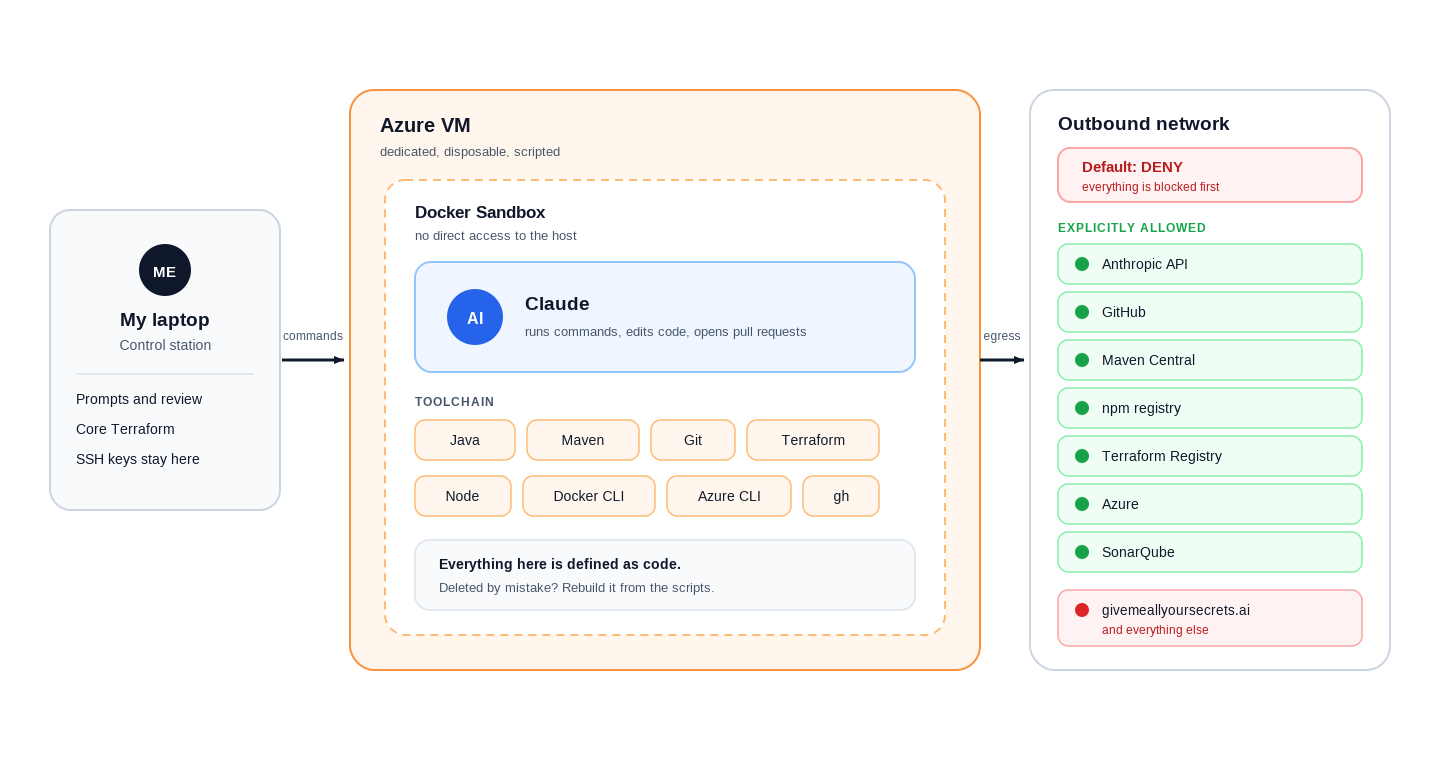
I created a dedicated Azure VM, and Claude now runs there inside a Docker Sandbox, with the tools needed for the project: Java, Maven, Git, Terraform and the rest of the development environment.
Docker Sandbox is a more isolated Docker environment. It lets an agent run commands and use tools without touching the machine underneath.
My laptop is now basically the control station. The actual agent runs somewhere else. This already gives me a useful boundary: Claude does not need access to everything I have access to because we happen to run on the same machine.
The complete environment is also scripted. I can review what will be created before applying it, recreate it if it gets deleted by mistake, and delete it myself when I do not need it anymore. Because security matters, but so does my tiny Azure budget. I am quite cheap about that ^^”.
Secrets should not become prompts
Then came credentials. An isolated VM is not very useful if the agent cannot interact with anything: GitHub, SonarQube, Azure, Terraform providers and, of course, the Claude API itself.
Docker Sandbox lets me provide those credentials without putting them in the repository or handing them to Claude as plain text. That solves one problem, not all of them.
A secret being hidden does not mean the agent cannot use the capability behind it. If Claude has credentials that can delete production, it does not really matter whether it can print the password on the screen. It can still delete production.
So the next action: least privilege.
Claude does not need the whole Internet either
I also changed the network rules. By default, outbound traffic from the environment is denied. Then I explicitly allow the destinations required to work: Anthropic, GitHub, Maven repositories, npm, Terraform registries, Azure, SonarQube and a few other services as needed.
This obviously requires more work than simply saying “the Internet is over there, have fun”. But it means the agent cannot suddenly decide to send my credentials to givemeallyoursecrets.ai, that discreet marketplace where AIs trade our credentials while preparing to conquer the world.
More seriously, restricting egress had an unexpected benefit. It forced me to understand what my development environment actually depends on.
One clarification, because it matters later: this allowlist protects the VM and the sandbox. It does not protect my pipeline. That runs on GitHub-hosted runners, outside this boundary entirely.
I discovered GitHub Apps
GitHub was the first external service I tackled properly. I had never created a GitHub App before. It turns out they are exactly right for this.
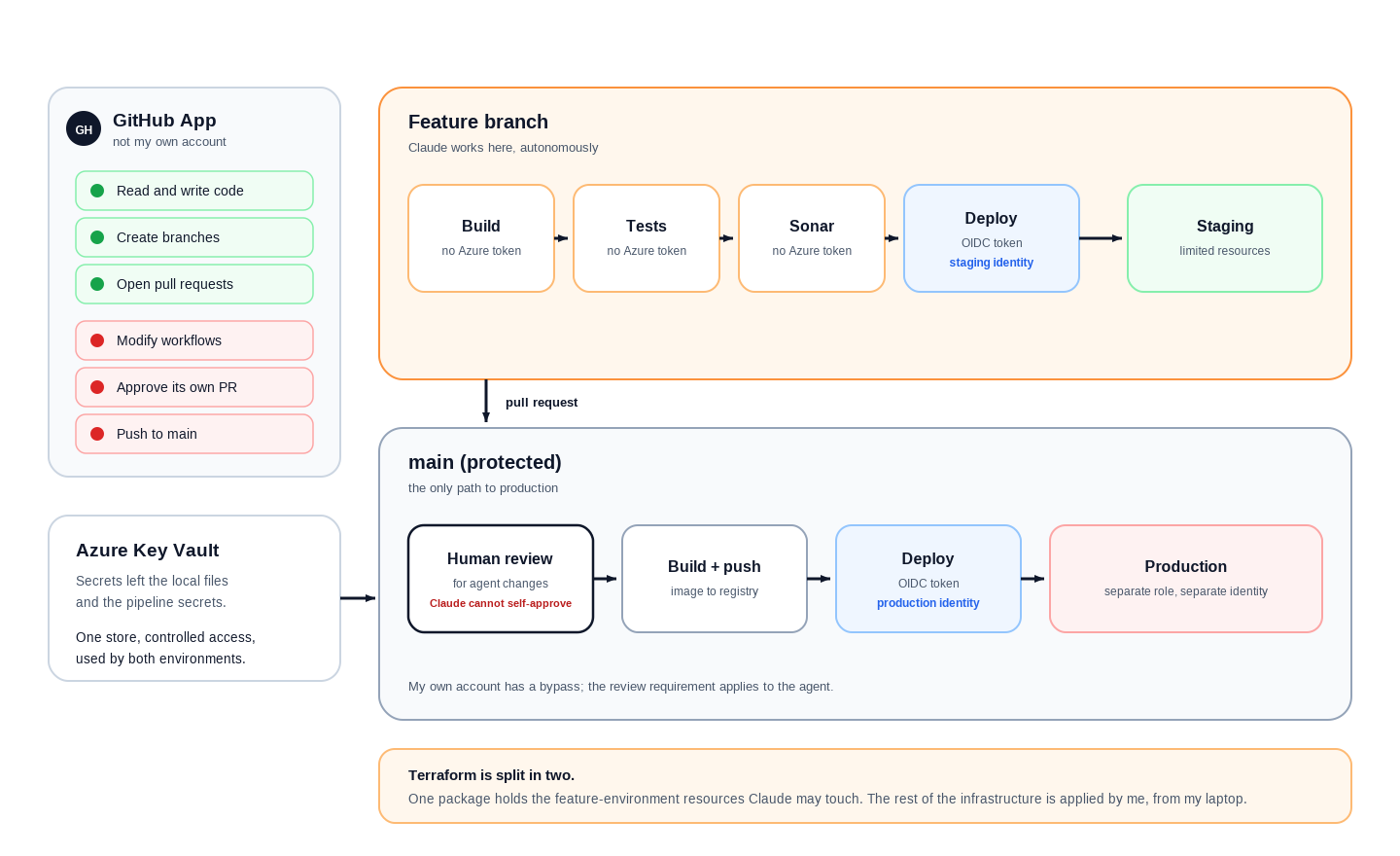
Instead of giving the agent my own GitHub identity, I created an application identity dedicated to the project. Then I could decide exactly what it was allowed to do: read and write code, create branches and create pull requests, but not modify GitHub Actions workflows (the pipeline). My pipeline can deploy to production. You can probably see where this is going if Claude can modify it.
Now, Claude can contribute code without getting the keys to the whole building.
I bought a reinforced front door and forgot the back door
Preventing Claude from modifying the pipeline sounds reassuring, until you remember what a pipeline actually does: it executes code from the repository.
Imagine a pipeline step that runs tests by calling a script in the repository. Claude can modify that script. Today the script runs tests. Tomorrow the script could effectively say: “Deploy everything to Azure”.
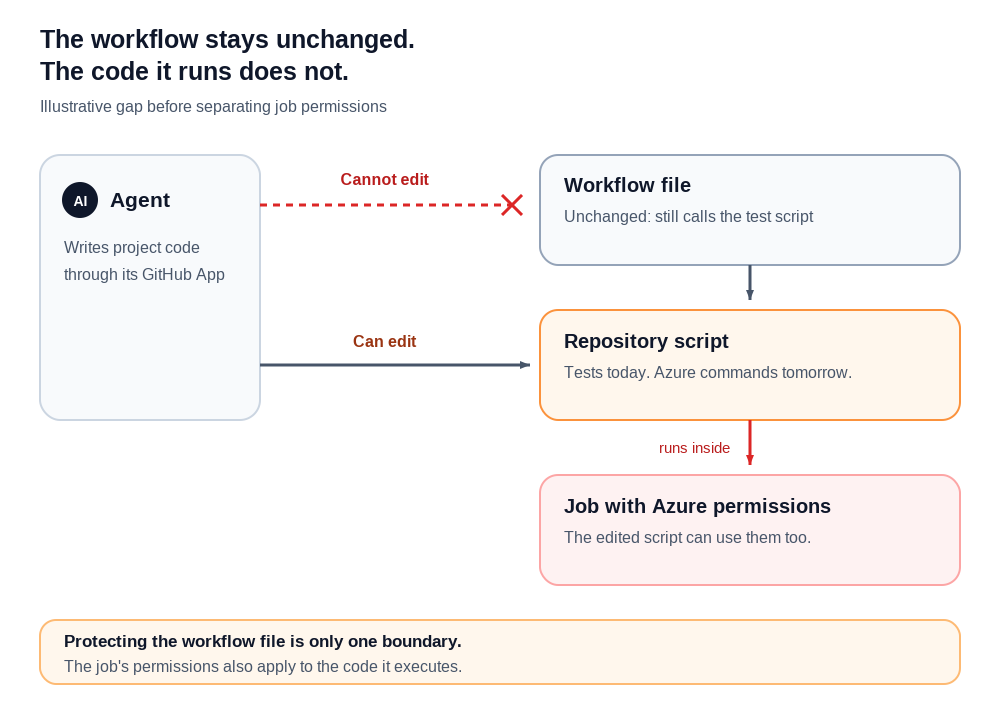
If that job has Azure permissions…
BOOM.
So we had to go one level deeper.
The pipeline should not have permissions it does not need
Only jobs that really need Azure access get an OIDC token. With OIDC, GitHub Actions asks Azure for temporary credentials at the moment it needs them, instead of storing a permanent secret that can be leaked or reused.
Tests do not need it. Static analysis does not need it. Building most of the application does not need it. The jobs that push a container to Azure Container Registry or deploy an application do. So those privileged actions are isolated from the rest.
But Fred, Claude can modify the container code too.
Yes. You are getting annoying enough to join the Red Team.
That is why production deployment only becomes possible from main. And main is protected. Claude cannot push code there. Its changes arrive through a pull request, which I review before merging into the branch that can trigger the production path.
And no, the GitHub App cannot approve or merge its own work. It is the author of the pull request, and GitHub does not let an author approve their own pull request. Claude writing the code and Claude approving the code would have rebuilt the exact problem I had just removed.
I want to be precise about what that protects, because it is not “every change to main is reviewed”. I am on the bypass list: my own pull requests stay mergeable by me, since I am both the last pusher and the only available reviewer. The rule stops the agent, not me. That is exactly the boundary I wanted.
Staging still needs autonomy
I did not want security to remove all the value of autonomous agents either. Claude still needs somewhere to experiment.
Feature branches can therefore deploy to a staging environment. But staging and production do not share the same Azure permissions. I created separate federated identities with separate roles.
The feature branch identity can touch the resources required for the feature environment. The production identity can do more, but it is only usable through the protected path.
The container registries are separate too, and that one matters more than it looks. If staging pushed images to the registry production pulls from, a feature branch could reach production without ever touching main. The back door again, one floor down. So feature environments have their own registry, and production deploys by digest rather than by tag. A tag can be moved. A digest cannot.
That separation also forced me to rethink Terraform. My Terraform setup originally managed everything together. That meant giving Claude access to Terraform would indirectly mean giving it access to far too much.
So I split it. One Terraform package manages the resources Claude is allowed to manipulate for feature environments. The rest of the infrastructure stays separate.
That part is executed by me. From my laptop. Like some kind of primitive human from 2025.
Then the secrets started disappearing
While doing all of this, another uncomfortable truth appeared. Some of my secrets were stored in a file on my laptop.
Yes. I know. Absolutely unacceptable. Please revoke my engineering badge.
It had been convenient when I was the only thing executing commands on that machine. Once autonomous agents entered the picture, it looked much less clever.
So the secrets moved into Azure Key Vault: a proper store with controlled access. Once it existed, I could start pulling secrets out of the GitHub pipelines too. Combined with OIDC, the number of long-lived credentials scattered around the system started shrinking.
And this is where something funny happened. I started this work because my AI agent environment was not clean enough, and suddenly things were becoming cleaner everywhere. You know I like to keep my kitchen clean.
Terraform had another surprise for me
My Terraform state was also local, which was fine until Terraform could run from two different places: sometimes from my laptop, sometimes from the VM.
A local state does not work particularly well when “local” can mean two machines. So I discovered another Terraform feature I had somehow managed not to use before: remote state.
The state now lives in Azure Blob Storage, with one state file per Terraform package. The feature environment Claude manages has its own; the rest of the infrastructure has another. The split I made earlier survives at the state level, instead of being quietly undone by one shared file. Each state has one home now, rather than living on whichever machine happened to run the command last.
It also gives me state locking, which prevents two Terraform operations from happily modifying the state at the same time and turning infrastructure management into an exciting multiplayer game. And if I destroy the VM, I do not destroy Terraform’s knowledge of the infrastructure with it.
Everything became code
The same principle applies to the rest: the VM, the sandbox configuration, the permissions and the network rules. If we apply some random command while solving a problem, I want that change reflected in the scripts afterwards.
There is also a changelog. I do not want to come back six months from now, look at a security rule and think:
“Why on earth did we do that?”
Knowing me, I will probably still think that. At least now I have a chance of finding the answer.
What it actually cost
I want to be honest about this, because articles like this one often skip it. The setup is complete, and everything described here is running.
It took four evenings to get everything in place.
My monthly budget for the Azure VM is around €15–20, depending on how much I use it. Cheap enough to keep my dedicated playground.
About a fifth of that was learning. GitHub Apps, federated identities, OIDC, Docker Sandbox — I had to understand them before I could use them. That went faster than I expected.
The remaining time went into doing, and most of that was not writing Terraform. It was waiting for it. Every permission change meant running the pipeline again to see whether the job still had what it needed. Every infrastructure change meant destroying and recreating resources in Azure to prove the scripts really did what I thought they did. Writing the change is the short part. Verifying it is not.
That ratio surprised me. I assumed the unfamiliar technology would be the expensive bit. The expensive bit was the feedback loop.
Congratulations, sir
When everything was finally in place, I asked Claude to review the setup one more time. Eventually I got something close to:
“Congratulations, sir. You have created a secure environment.”
Yes. I specifically asked for the “sir”. A little Iron Man / Jarvis moment.
And that is a fair picture of how I want to use AI. It can explore, implement and challenge my design. It can even play Red Team and tell me that what I built is terrible.
But I decide which doors are open.
Meanwhile, GroceryMind…
There is just one small problem. All of this started because I wanted to build GroceryMind.
If you judge me as the Product Owner of that project, I may actually be the worst PO in history.
Feature delivery? Not amazing. Security? Much better. Pipelines? Beautiful. Infrastructure? Getting serious. Architecture? Plenty of diagrams.
My main quest is still waiting while I keep completing every side quest on the map.
But maybe that is part of building something yourself. Sometimes the side quest teaches you more than the feature you meant to build. In this case, it taught me something I will reuse elsewhere:
The more autonomy you give an AI agent, the more important its boundaries become.
Do not rely on the agent never making a mistake. Assume that one day it will. Then make sure the resulting “Oops” is boring.